Bulk Carrier Maintenance and Compliance Software
Planned maintenance, spare parts, crew certificates, hours of rest and ISM, MARPOL and ballast water records for dry bulk fleets, on board and in the office.

Who this is for
- You run the technical or crewing side of a dry bulk fleet (Handysize, Supramax, Panamax, Capesize)
- Planned maintenance still lives in spreadsheets, paper or a different file on every ship
- Crew certificates and hours of rest are checked by hand before audits and port state control inspections
- MARPOL and ballast water entries, drills and ISM items are spread across logbooks and shared folders
- Your voyage, chartering and emissions work already runs in other tools, and you want those left as they are
A bulk carrier works hard: cargo gear, hatch covers, main and auxiliary engines, ballast systems and safety equipment all need planned maintenance, and the crew who do it change every few months. At the same time, every ship carries a compliance load that does not change with the cargo: crew certificates with different expiry dates, hours of rest that must meet MLC and STCW limits, ISM and ISPS records, drills, and MARPOL and ballast water entries that surveyors and port state control can ask to see.
SupaMaritime Merchant is maintenance, spare parts, crew and compliance software for that side of the operation. It keeps planned maintenance and work orders tied to equipment, spare parts in an onboard inventory, crew certificates and hours of rest, and a compliance hub for ISM, ISPS, audits, drills, vessel certificates, MARPOL and ballast water records, per vessel and across the fleet.
It is not a commercial system. Voyage estimation, chartering, charter parties, laytime and demurrage, bunker purchasing, cargo documentation and emissions reporting stay in the tools you already use for them. SupaMaritime does not connect to those tools; it covers the technical, crew and compliance work around them.
Where the day breaks down
Maintenance history leaves with the crew
Jobs on cranes, hatch covers and engines are tracked in a spreadsheet or on paper that differs per ship. When the chief engineer signs off, part of the history goes with them.
Rest hours get squeezed in port
Loading and discharging compress the working day. Rest-hour sheets are often filled in afterwards, and a shortfall only shows up when an auditor looks at the records.
Certificates expire on different dates
Crew certificates, vessel certificates and inspection dates each follow their own calendar. Keeping track across several ships by email and spreadsheets is where renewals slip.
Audits mean collecting evidence from everywhere
Before an internal audit or a port state control inspection, someone has to gather drills, ISM items, checklists and certificates from logbooks, folders and inboxes.
MARPOL and ballast water records on paper
Garbage, sewage, oil and air pollution entries and ballast water operations are written by hand on board, so the office has no easy view of them until the next visit.
Nobody knows what spare parts are on board
Parts are used without being booked out, stock levels are guessed, and orders go out late or twice because the onboard inventory is not up to date.
Built around the workflow, not bolted on top
SupaMaritime Merchant brings maintenance, spare parts, crew and compliance records for each bulk carrier into one web app, with a fleet view for the office. Here is what it does, and only what it does.
Planned maintenance and work orders
Maintenance tied to an equipment register and scheduled by calendar or running hours. Work orders are opened and closed on board, and defects are recorded against the equipment.
Onboard inventory and spare parts
Spare parts are kept in an onboard inventory; parts used on a job come off stock. Inventory orders track what has been requested for each vessel.
Crew certificates and hours of rest
Crew records with certificates and expiry alerts, a duty roster, timesheets and leave requests. Hours of rest are checked against MLC and STCW limits.
ISM, ISPS, audits and drills
A compliance hub for ISM and ISPS items, audits and drills, insurance inspections and vessel certificates with expiry reminders.
MARPOL and ballast water records
MARPOL record entries for Annexes I, IV, V and VI, and ballast water (BWM) records, kept per vessel and visible from the office.
Fleet dashboard, documents and checklists
A dashboard of overdue maintenance, expiring documents, low stock and open defects, plus checklists, logbooks, documents with expiry reminders and contacts.
Illustrative example: a small dry bulk fleet moves its technical records into one system
A hypothetical operator runs four Supramax bulk carriers. Voyage estimates, charter parties and laytime are handled by the commercial team in its own software and stay there. The technical superintendent wants maintenance, crew and compliance records in one place for all four ships.
Before SupaMaritime
After SupaMaritime
Each ship keeps its own maintenance spreadsheet; the office sees overdue jobs only when the chief engineer reports them.
Maintenance is scheduled against each ship's equipment register by calendar or running hours, and work orders are closed on board.
Hours of rest are recorded on paper sheets and checked by hand before audits.
Parts used on a job come off the onboard inventory, and low stock appears on the dashboard.
Crew certificate expiry dates sit in an office spreadsheet that nobody updates after crew changes.
Crew enter hours of rest in the app, which checks them against MLC and STCW limits.
Drills, ISM items and checklists are in binders on board and in shared folders ashore.
Crew and vessel certificates carry expiry alerts, visible across the fleet.
MARPOL and ballast water entries exist only in the paper record books.
Drills, audits, ISM and ISPS items are logged in the compliance hub, with checklists and documents next to them.
Spare parts stock is unknown until someone counts it.
MARPOL Annex I, IV, V and VI entries and ballast water records are kept per vessel and visible from the office.
Facts you can check
Rest hours are checked against MLC and STCW limits, so shortfalls show up before an audit does.
Entries for MARPOL Annexes I, IV, V and VI, plus ballast water (BWM) records, per vessel.
Per vessel per month + VAT, with 5 crew seats included per vessel. A free plan is available.
Export your data at any time, with files in their original format and no export fee.
What SupaMaritime Merchant covers on a bulk carrier, and what it leaves to other tools
Running a dry bulk fleet splits into two kinds of work. The commercial side fixes cargoes, negotiates charter parties, estimates voyages, calculates laytime and demurrage and buys bunkers. The technical and crew side keeps the ships maintained, manned by certified crew who get their rest, and ready for audits and inspections.
SupaMaritime Merchant is built for the second kind of work. It has planned maintenance and work orders, an equipment register and defects, an onboard inventory, crew records with certificates and hours of rest, and a compliance hub for ISM, ISPS, audits, drills, vessel certificates, MARPOL and ballast water records.
It has no voyage estimator, charter party or laytime module, no cargo documentation, no bunker or fuel management and no emissions reporting, and it does not connect to the software you use for those. If your commercial team already has a system it likes, it keeps it; SupaMaritime sits alongside it for the technical and compliance records.


One view of the fleet from the office
When each ship keeps its records in its own files, the office learns about problems when someone reports them. The superintendent phones or emails the ship to ask what is overdue, which certificate expires next, or whether the last drill was held.
In SupaMaritime Merchant the office sees every vessel in one multi-vessel view. The dashboard shows overdue maintenance, expiring documents, low stock and open defects, and each record opens the vessel it belongs to. Permissions are set by role and department, so crew see their own ship and the office sees the fleet.
The app runs in the browser on desktop, tablet and phone, in English, Italian, Spanish, French, German and Portuguese. On board, the last synced data stays readable when the signal drops. Everything can be exported as CSV, JSON or XLSX at any time.
Hours of rest when the ship is working cargo
MLC 2006 and STCW set minimum hours of rest for seafarers: at least 10 hours in any 24-hour period and 77 hours in any 7-day period, in no more than two periods, one of which is at least 6 hours long. Port calls with loading, discharging, shifting and inspections are when those limits come under pressure.
Hours of rest are also among the records inspectors routinely look at. If rest-hour sheets are filled in after the fact, errors and shortfalls are found at the audit, not at the time they could have been fixed.
In SupaMaritime Merchant crew record their hours of rest in the app, alongside the duty roster and timesheets. The records are checked against the MLC and STCW limits, so the master and the office can see where a day or a week falls short while there is still time to adjust the watch plan.

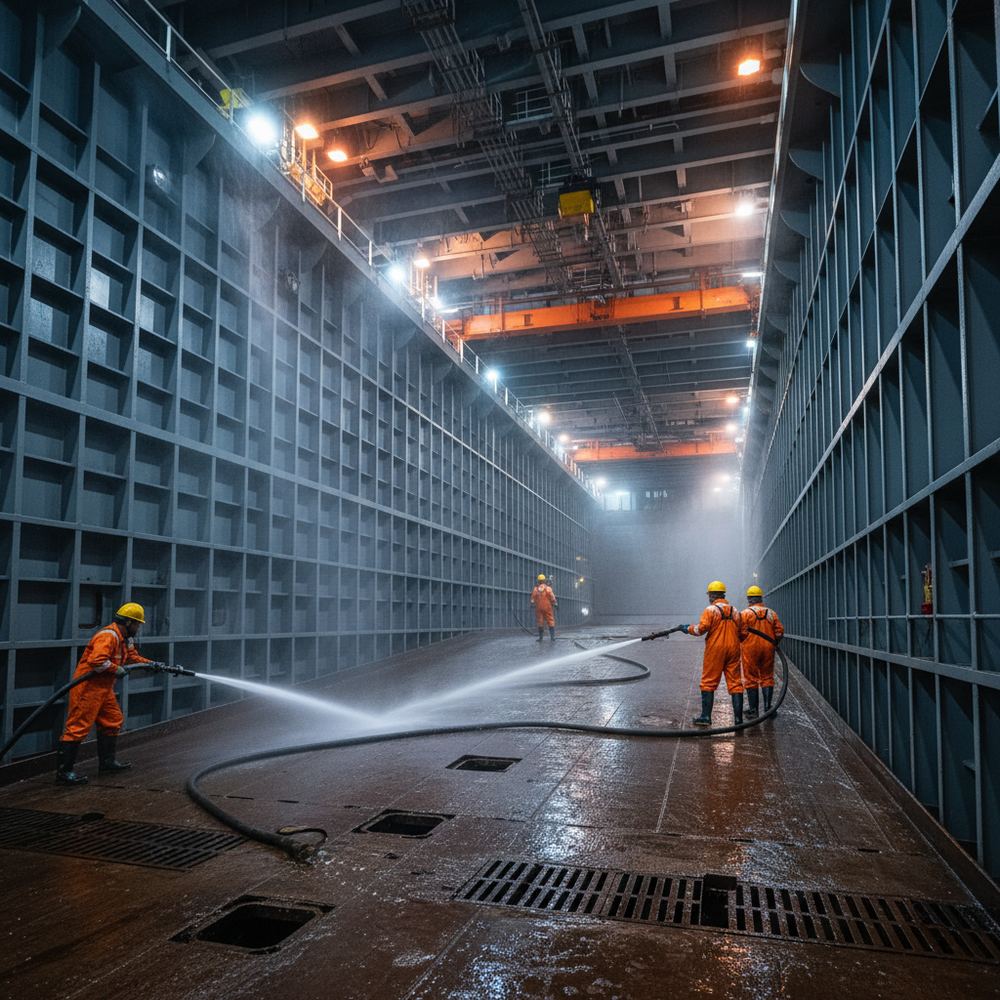
Hold cleaning, enclosed spaces and the records behind them
Changing cargo means cleaning holds, and hold cleaning produces records of its own. Under MARPOL Annex V, discharges of cargo residues and hold washing water are regulated and recorded. SupaMaritime Merchant does not plan hold cleaning or estimate how long a clean will take, but it does let the crew keep MARPOL record entries, including Annex V, per vessel.
Cleaning and inspecting holds often means entering enclosed spaces, and SOLAS requires enclosed space entry and rescue drills at least every two months. Drills are recorded in the compliance hub, next to ISM items and audits, and checklists keep routine safety checks in the same system instead of a binder.
Hatch covers, hold bilge systems and ballast pumps are equipment like any other: they can sit in the equipment register with planned maintenance by calendar or running hours, and defects found during a clean can be recorded against them. Before relying on any electronic record in place of an official record book, check what your flag administration accepts.
How this compares to the alternatives
Commercial and voyage management platform used by bulk operators for chartering, voyage estimation and laytime. It covers different work from SupaMaritime Merchant.
Voyage management system for the commercial operations of shipping companies. It covers different work from SupaMaritime Merchant.
A common starting point for maintenance, certificate and rest-hour records in smaller fleets. Flexible, but the records differ from ship to ship.
Frequently asked questions
Does SupaMaritime Merchant do voyage estimation, charter parties or laytime and demurrage?
What does SupaMaritime Merchant do for a bulk carrier fleet?
Can we keep MARPOL and ballast water records in it?
Does it handle IMSBC cargo documentation or bills of lading?
Does it cover CII, EEXI, EU ETS, FuelEU or bunker management?
Does it connect to AIS, our commercial system or other software?
Can the crew use it on board with poor connectivity?
How much does it cost?
See it in your workflow, not a generic demo
We'll walk through built for bulk carrier operators.
Free plan with Dashboard, Contacts, Inventory and Documents. Pro is €199 per vessel per month + VAT. For larger fleets, contact us for a quote.